Capture by Screenshot
Run your app, screenshot anything off, share to Dev Notes++. Save as a Bug, Feature, or Idea in seconds — the fastest way to log issues without breaking your flow.
The indie developer's all-in-one tracker for bugs, features, ideas, screenshots, and launch posts — synced across iPhone, iPad, and Mac via iCloud.

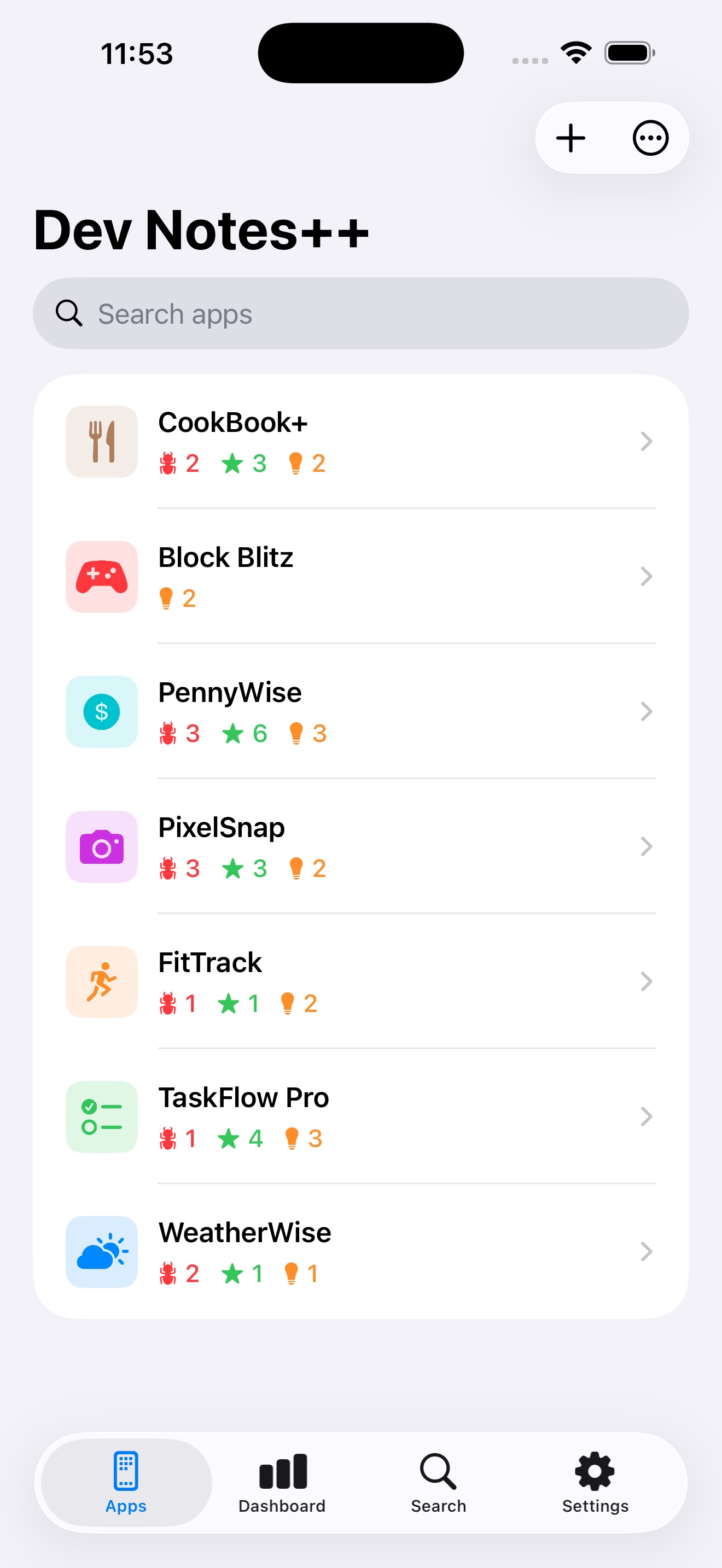
One app to manage your entire development workflow — from first commit to App Store release.
Run your app, screenshot anything off, share to Dev Notes++. Save as a Bug, Feature, or Idea in seconds — the fastest way to log issues without breaking your flow.
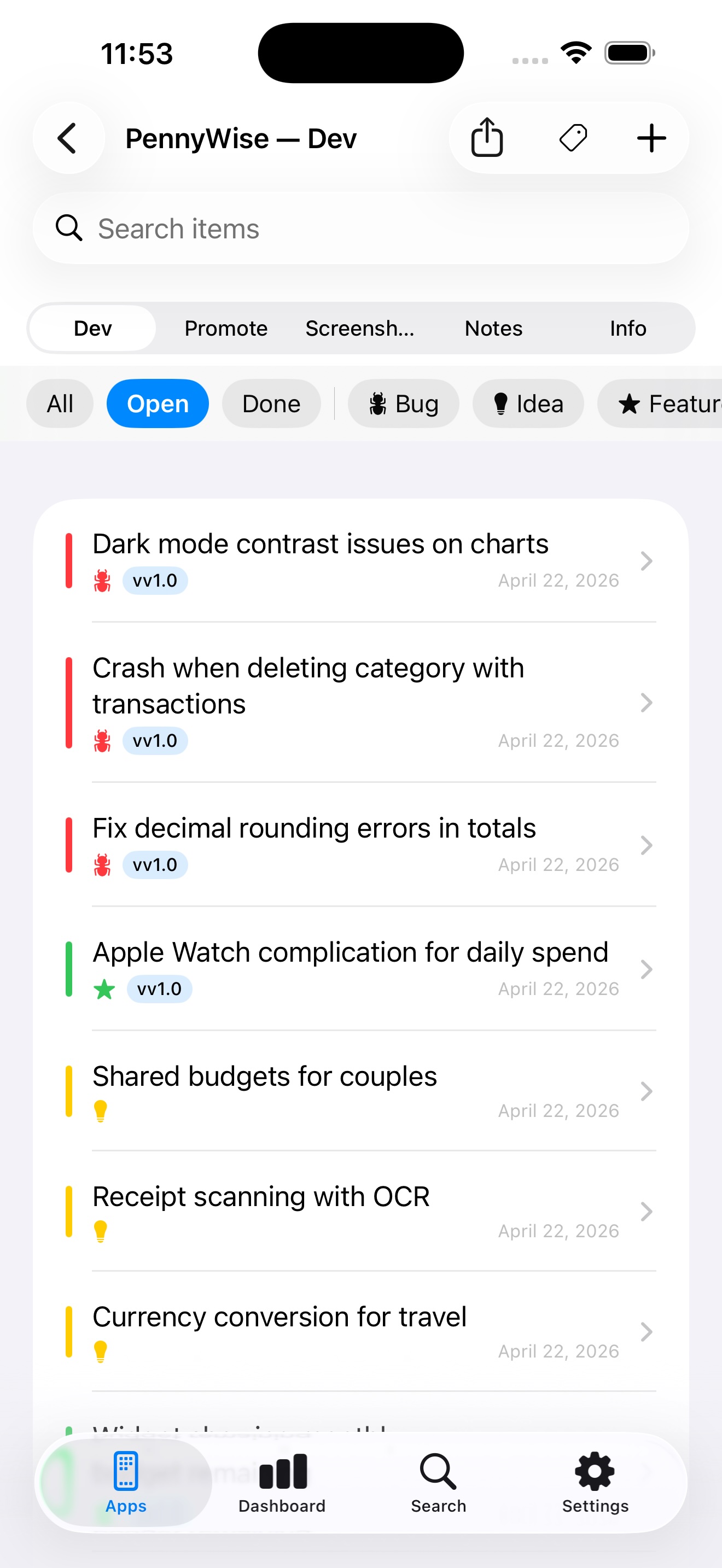
Log bugs with notes and images. Assign target versions. Swipe right to mark done.
Organize features by version. Filter by status, type, and version. Duplicate or move between apps.
Never lose an idea. Quick capture from anywhere via the system share sheet.
Per-app rich text notes with bold, lists, checklists, inline photos, and full-text search.
Completion ring, 7-day activity, momentum cards, and per-app overview. Filter by date range, version status, item type, or selected apps.
Track Planned, In Dev, and Released versions. Target items to specific releases.
Paste a link to fetch icon, info, screenshots, locales, and in-app purchases in one tap.
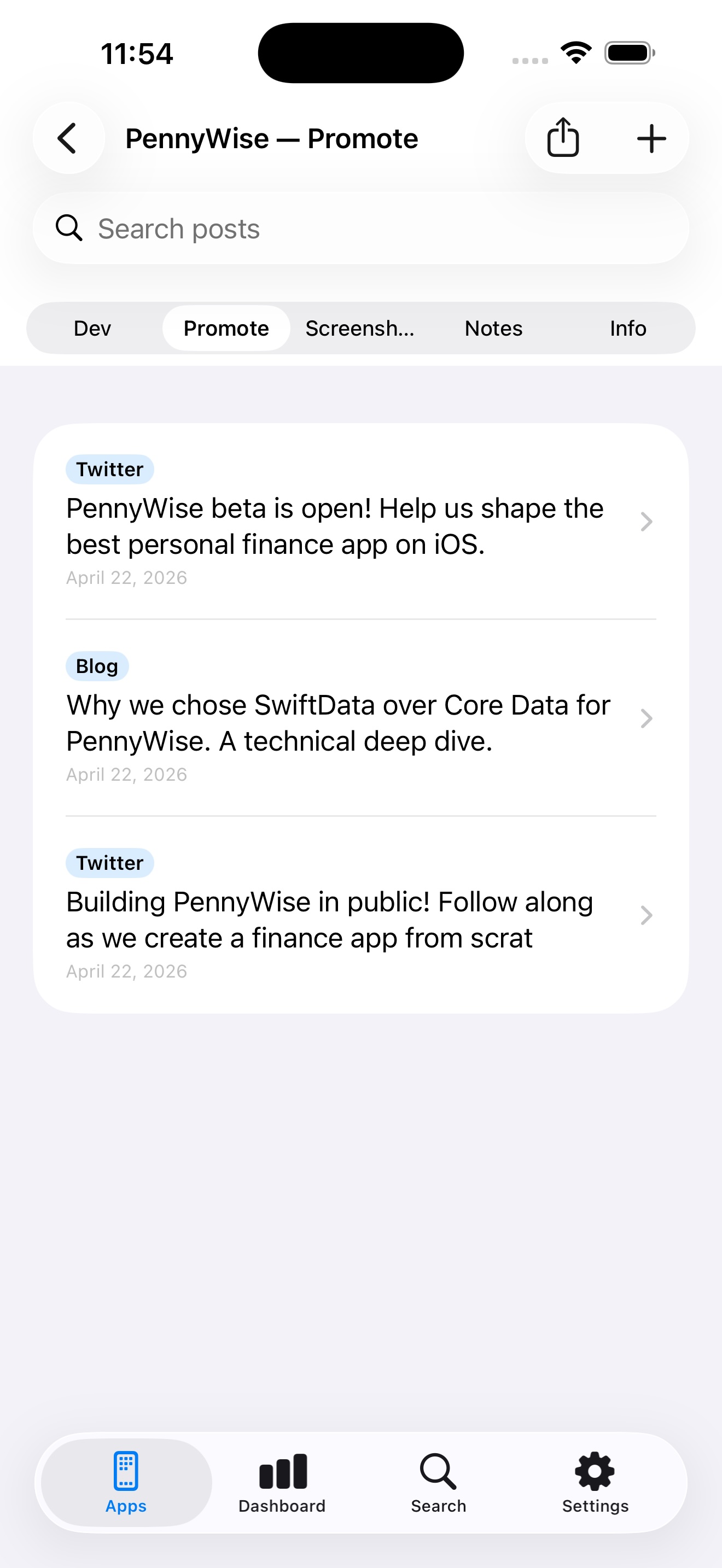
Draft launch posts with character count. Append your App Store URL in one tap. Track share log.
Manage App Store screenshots across 65 locales. Grouped by device (iPhone, iPad, Watch, Mac, TV).
Export to JSON & Markdown, PDF report, or CSV spreadsheet. Full backup & selective restore.
Search across all apps, items, and posts instantly. Tap any result to jump directly to it.
Native on all three. Buy once, use everywhere. Data syncs automatically via iCloud.
Each app gets five dedicated sections so nothing gets lost — plus a global Dashboard rolling up every app.
Bugs, features & ideas with filters and versions
Draft launch posts and track share activity
Manage screenshots across 65 locales
Rich text notes with images and search
App Store details, rating & description
Stats, activity, and progress across all apps
Start with a free trial on the yearly plan. Pick monthly, yearly, or lifetime — all plans include every feature on iPhone, iPad, and Mac.
Dev Notes++ stores everything on your device and syncs via iCloud. We never see your data.
Zero analytics or telemetry.
All data stays on your iPhone, iPad, and Mac.
No sign-up or login required.
Only your data syncs via iCloud.
Dev Notes++ offers three plans: monthly, yearly (with a free trial), or a one-time lifetime purchase. Every plan unlocks every feature on iPhone, iPad, and Mac. See current pricing on the App Store.
Bugs, features, ideas, rich text notes, App Store screenshots across 65 locales, social media posts, version statuses, and App Store info. Everything is organized per app.
No. All data stays on your device and syncs via iCloud. There is no tracking, no analytics, and no data collection. We never see your data.
Yes! Everything syncs automatically via iCloud across all your Apple devices. Your data never touches our servers.
Yes! Export to JSON & Markdown, generate a PDF report with images and stats, or export as a CSV spreadsheet. You can also create full backups and restore selectively.
Run your app. When you spot something off, take a screenshot, then share it to Dev Notes++ from the system share sheet. Pick the type (Bug, Feature, Idea), pick the version, done. Your last-used app is remembered for one-tap repeat captures. You can also share multiple screenshots into a single item.
Yes. Use the iOS share sheet from any app to send screenshots, text, links, or images directly into Dev Notes++. Save as a Bug, Feature, Idea, Post, or Notes. URLs show a rich preview card.
Dev Notes++ runs natively on iPhone, iPad, and Mac (Apple Silicon and Intel via Mac Catalyst). Buy once, use it everywhere. CloudKit syncs your data across all your Apple devices.
Dev Notes++ is made by Sylvain Lafrance, an indie iOS developer publishing under the myrcbox name. For questions, email support@myrcbox.com.
Tap to expand.
Effective May 14, 2026
Dev Notes++ (the "App") is created and operated by Sylvain Lafrance, doing business as myrcbox ("we," "us," or "our"). This Privacy Policy explains how the App handles information when you use it.
Dev Notes++ does not collect, store, transmit, or share any personal information. We do not use analytics, advertising identifiers, or any third-party tracking services. We have no servers that receive your data.
All data you create in Dev Notes++ (apps, bugs, features, ideas, notes, posts, screenshots) is stored locally on your device using Core Data. This data is never sent to us or any third party.
If you have iCloud enabled on your device, your Dev Notes++ data syncs between your devices via Apple's CloudKit service. This sync is managed by Apple under Apple's privacy policies. We do not have access to your iCloud data.
Dev Notes++ Pro is offered as a subscription (monthly, yearly, or lifetime) through the Apple App Store. All transactions, billing, and receipts are handled by Apple. We do not receive your payment information or any personally identifying details about you.
When you use the "Fetch App Store Info" feature, Dev Notes++ sends a request to Apple's public iTunes Search API to retrieve your app's metadata (name, description, rating, screenshots, etc.). No personal data is included in this request.
If you opt in to share app diagnostics with developers in iOS Settings, anonymized crash logs may be made available to us through Apple. These reports contain no personal information and are used solely to identify and fix bugs.
Dev Notes++ is not directed to children under 13 (or the equivalent minimum age in your jurisdiction). We do not knowingly collect information from children.
We may update this Privacy Policy from time to time. Material changes will be reflected by an updated effective date at the top of this section.
Questions about this policy? Email support@myrcbox.com.
Effective May 14, 2026
By downloading, installing, or using Dev Notes++ (the "App"), you agree to be bound by these Terms of Use ("Terms"). If you do not agree, please do not use the App.
We grant you a limited, non-exclusive, non-transferable, revocable license to use Dev Notes++ on any Apple-branded device that you own or control, subject to these Terms and Apple's Media Services Terms and Conditions.
You agree to use Dev Notes++ only for personal, non-commercial purposes and in compliance with all applicable laws and regulations.
You may not:
Dev Notes++ Pro is offered as a subscription (monthly, yearly, or lifetime) through the Apple App Store. All purchases are subject to Apple's refund and billing policies. Pro features may evolve over time at our discretion. You can manage or cancel subscriptions in your Apple ID settings.
Dev Notes++, including its design, code, content, and trademarks, is owned by Sylvain Lafrance (myrcbox) and is protected by copyright and other intellectual property laws. All rights not expressly granted are reserved.
The App is provided "as is" and "as available," without warranties of any kind, whether express or implied, including but not limited to warranties of merchantability, fitness for a particular purpose, and non-infringement. We do not warrant that the App will be uninterrupted, error-free, or free of harmful components.
To the maximum extent permitted by law, in no event shall Sylvain Lafrance or myrcbox be liable for any indirect, incidental, special, consequential, or punitive damages, or any loss of data, profits, or goodwill, arising out of or related to your use of the App.
You acknowledge that these Terms are concluded between you and us, not with Apple, and that Apple is not responsible for the App or its content. Apple has no obligation to provide maintenance or support services for the App. In the event of any failure of the App to conform to any applicable warranty, you may notify Apple, and Apple may refund the purchase price (if any).
We may suspend or terminate your right to use the App at any time, without notice, if you breach these Terms. Upon termination, you must cease all use of the App and delete it from your devices.
We may revise these Terms from time to time. The updated version will be indicated by a revised effective date. Continued use of the App after changes take effect constitutes your acceptance of the revised Terms.
These Terms are governed by the laws of the Province of Quebec, Canada, without regard to its conflict of law principles. Any disputes shall be resolved in the courts located within Quebec.
Questions about these Terms? Email support@myrcbox.com.
Questions, feedback, or need help? I'd love to hear from you.
Contact meUsually a reply within 1–2 business days.
Start your free trial today. iPhone, iPad & Mac.